



Use database for nestjs backend configuration
Managing configuration in a complex application is always a trade-off between security, flexibility, and ease of use. In this article, I explore a hybrid approach using both environment variables and a database-backed configuration system for a NestJS backend.
DB configuration Vs .env
The standard "Twelve-Factor App" methodology suggests storing config in the environment (e.g., .env files). While this is excellent for secrets and infrastructure-level settings, it has limitations for runtime configuration.
Pros and Cons
- .env: Secure and standard, but requires a restart to change values and is hard to manage dynamically via a UI.
- Database: dynamic and queryable, but adds a dependency on the DB connection for the app to start.
My Philosophy
I decided to maintain a strict separation:
- Mandatory to Boot: Keep inside
.envonly what is strictly necessary to start the application (Database credentials, JWT secrets, basic port binding). - Runtime Config: Move business logic configuration (e.g., feature flags, external API limits, UI preferences) into the database.
My implementation
SQL Schema
I used a simple table structure with a JSONB column to store flexible configuration values. This allows me to store strings, numbers, or complex objects without changing the schema.
CREATE TABLE config (
    key VARCHAR(50) PRIMARY KEY,
    description TEXT,
    is_env_value BOOLEAN NOT NULL DEFAULT FALSE,
    value JSONB NOT NULL,
    created_at timestamp without time zone DEFAULT CURRENT_TIMESTAMP,
    updated_at timestamp without time zone DEFAULT CURRENT_TIMESTAMP,
    deleted_at timestamp without time zone
);
Example Data
INSERT INTO config ("key",description,is_env_value,value,created_at,updated_at,deleted_at) VALUES
	 ('URLS_CONFIG','Configura urls',true,'{"BACKEND_URL":"http://localhost:3000","FRONTEND_URL":"http://localhost:4200","UPLOAD_PUBLIC_URL":"http://localhost:3000/uploads","N8N_BASE_URL":"http://localhost:5678","N8N_FASTAPI_CONFIG":"/webhook/fastapi/config","N8N_INGEST_WEBHOOK":"/webhook/ingest","N8N_QUERY_WEBHOOK":"/webhook/query","N8N_ENGINE_MANAGER":"/webhook/engine-manager","N8N_DELETE_WEBHOOK":"/webhook/delete","N8N_DISCOVER_MODELS_WEBHOOK":"/webhook/discover-models"}','2026-01-25 11:17:33.18413','2026-02-02 14:13:42.607364',NULL),
	 ('LDAP_CONFIG','LDAP authentication settings (migrated from .env)',true,'{"LDAP_AUTH":true,"LDAP_DIRECT_BIND":"false","LDAP_TIMEOUT":"3000","LDAP_SERVER":"ldap://host.docker.internal:389","LDAP_BASE_DN":"ou=peoples,dc=example,dc=org","LDAP_FILTER":"(&(objectClass=person)(uid={username}))","LDAP_APP_USER":"cn=admin,dc=example,dc=org","LDAP_APP_PASS":"[LDAP_APP_PASS]","LDAP_FIELD_MAP":"uid:username,mail:email,cn:fullName","LDAP_PASSWORD_CHANGE":"http://localhost:4200"}','2026-01-23 10:57:36.744778','2026-01-25 14:52:18.87003',NULL),
	 ('EMAIL_CONFIG','Configurazione invio email',true,'{"MAIL_HOST":"smtp.gmail.com","MAIL_PORT":"465","MAIL_SECURE":"true","MAIL_FROM":"[YOUR_EMAIL_HERE]","MAIL_BCC":"","MAIL_USER":"[YOUR_ACCOUNT_HERE]","MAIL_PASSWORD":"[YOUR_PASSWORD_HERE]","MAIL_LANGUAGES":"it,en","EMAIL_TEMPLATE_PATH":"./data/templates/email"}','2026-01-25 10:53:33.312718','2026-01-29 08:32:03.969394',NULL);
Configuration Service
The core logic resides in a ConfigService. On module initialization, it loads all configurations from the database into an in-memory Map cache. This ensures that reading configuration is as fast as reading a variable, without hitting the DB every time.
Key features:
- Caching: All values are cached in memory.
- Fallback: If a key isn't found in the DB, it falls back to the NestJS
ConfigService(checking.env). - Flattening: It supports "sparse" values, flattening JSON objects into dot-notation keys for easier retrieval.
// rag-config.service.ts (Excerpt)
async loadAllConfigIntoCache(): Promise<void> {
  const allConfigs = await this.findAll();
  this.configCache.clear();

  allConfigs.forEach(config => {
    this.configCache.set(config.key, config.value);
    // Flatten logic for sparse values...
  });

  // Notify the app that config has changed
  this.eventEmitter.emit('config.reloaded');
}

public get<T>(key: string, defaultValue?: any): T {
  // 1. Check DB cache
  if (this.configCache.has(key)) {
    return this.configCache.get(key) as T;
  }
  // 2. Fallback to .env
  return this.nestConfigService.get<T>(key) ?? defaultValue;
}
Real World Usage: Mailer Service
Here is how the MailerService listens for the reload event and re-initializes the transport with the new settings.
@OnEvent('config.reloaded')
async onConfigReloaded() {
  this.initializeMailer();
}

private initializeMailer() {
  const configService = this.configService;
  this.transporter = nodemailer.createTransport({
    host: configService.get<string>('MAIL_HOST'),
    port: configService.get<number>('MAIL_PORT'),
    secure: configService.get<string>('MAIL_SECURE') === 'true',
    auth: {
      user: configService.get<string>('MAIL_USER'),
      pass: configService.get<string>('MAIL_PASSWORD'),
    },
  });
  this.templateBasePath = configService.get<string>('EMAIL_TEMPLATE_PATH') || join(__dirname, 'templates');

  const langs = configService.get<string>('MAIL_LANGUAGES', 'en');
  this.supportedLanguages = langs.split(',').map(l => l.trim()).filter(Boolean);

  const subjectsPath = join(this.templateBasePath, 'email-subjects.json');
  try {
    this.emailSubjects = JSON.parse(fs.readFileSync(subjectsPath, 'utf-8'));
    this.logger.log(`Loaded email subjects for languages: ${Object.keys(this.emailSubjects).join(', ')}`);
  } catch (err) {
    this.logger.error(`Failed to load email subjects: ${err.message}`);
    this.emailSubjects = {};
  }

  const bccEmail = configService.get<string>('MAIL_BCC', '');
  this.emailBcc = this.validateBccEmail(bccEmail);
}
Event Emitter
To make the system dynamic without restarts, I used EventEmitter2. When a configuration is updated via the API, the service emits a config.reloaded event. Other services can listen to this event and react immediately (e.g., reconnecting a client or clearing a specific cache) without a full application restart.
Frontend manager
To manage these configurations easily, I built an Angular component using a JSON editor. This allows me to create, edit, and delete configuration keys directly from the admin dashboard.
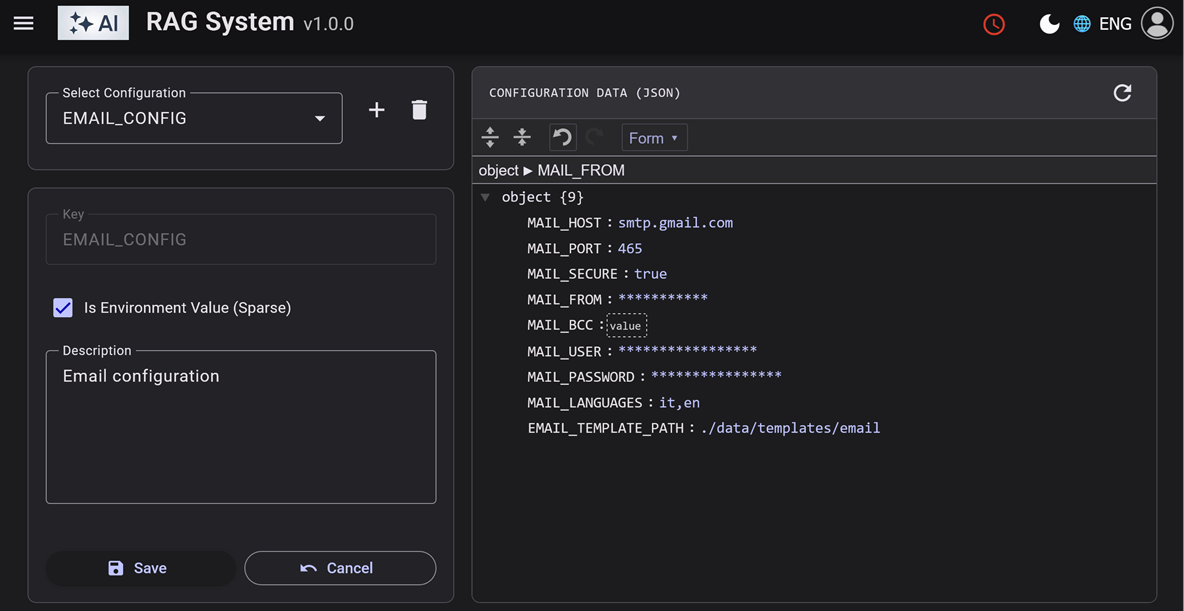
The manager handles:
- CRUD Operations: Create, Read, Update, Delete configurations.
- JSON Validation: Uses a visual JSON editor to ensure the
valuecolumn contains valid data. - Hot Reload: A "Refresh" button triggers the backend reload sequence.
// config-management.component.ts (Excerpt)
onSave(): void {
  if (this.configForm.valid) {
    const data = this.configForm.getRawValue();
    // Get complex object from JSON editor
    if (this.editor) {
      data.value = this.editor.get();
    }

    const obs = this.isNew
      ? this.configService.create(data)
      : this.configService.update(data.key, data);

    obs.subscribe(() => {
        // Handle success...
    });
  }
}
This setup provides the best of both worlds: the stability of environment variables for core infrastructure and the flexibility of database configuration for business logic.
This is part of my RAD System Framework. Complete code in Github.