



Controlled, Modular, Expert-driven RAG Platform
In the age of AI, organizations are drowning in documentation. Policy manuals, training materials, internal wikis, technical specs—the information exists, but finding the right answer at the right time remains a challenge. This is the story of building a production-ready Retrieval-Augmented Generation (RAG) system designed to solve this problem while respecting one critical constraint: data sovereignty.
What is RAG?
Retrieval-Augmented Generation is a technique that enhances Large Language Models (LLMs) by grounding their responses in your own documents. Rather than relying solely on the model's pre-trained knowledge, RAG systems:
- Retrieve relevant information from a curated knowledge base
- Augment the LLM's prompt with this context
- Generate accurate, source-cited answers
Think of it as giving an AI assistant a photographic memory of your organization's documentation, with the ability to cite exactly where each fact came from.
The Problem RAG Solves:
- LLMs have outdated or generic knowledge
- Fine-tuning is expensive and impractical for frequently updated content
- Hallucinations can be dangerous in enterprise contexts
- No source attribution means no trust
The RAG Solution:
- Fresh, organization-specific knowledge
- Simple document updates (no retraining needed)
- Grounded responses with citations
- Explainable and auditable answers
The Privacy Challenge: Why Agnostic Architecture Matters
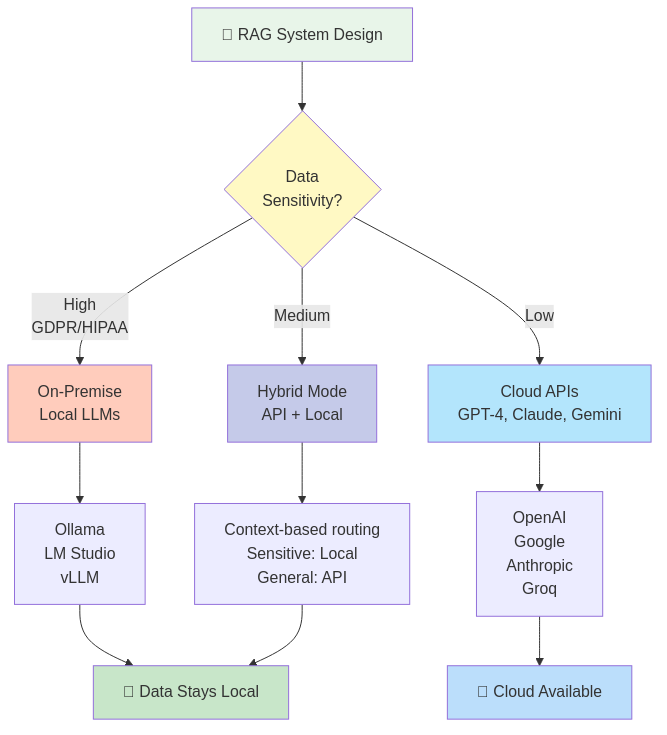
During the design phase, I faced a critical decision: cloud-based LLM APIs or on-premise inference? The answer was both—and that choice shaped the entire architecture.
The Enterprise Reality
Different organizations have different constraints:
On-Premise Requirements:
- Healthcare providers bound by HIPAA
- Financial institutions with PCI-DSS compliance
- Government agencies with classified data
- European companies under GDPR strict interpretation
Cloud API Benefits:
- Startups needing rapid deployment
- Teams without ML infrastructure expertise
- Projects with variable workload (pay-per-use)
- Access to cutting-edge models (GPT-4, Claude, Gemini)
The Agnostic Solution
Rather than forcing a choice, the system supports seamless switching between:
- Cloud APIs: OpenAI, Google Gemini, Anthropic Claude, Groq
- Local Engines: Ollama, LM Studio, vLLM, llama.cpp
- Hybrid Mode: Sensitive data processed locally, general queries via API
No code changes required—just configuration updates. This means:
- Start with cloud APIs for fast prototyping
- Transition to on-premise as compliance needs grow
- Run both simultaneously for different contexts
- Evaluate new models without architectural rewrites
Architecture Overview: Microservices by Design
The system is built as a distributed microservices architecture, where each component has a single, well-defined responsibility. This approach enables:
- Independent scaling of compute-heavy services (embeddings, inference)
- Technology-specific optimization (Python for NLP, TypeScript for business logic)
- Clear separation of concerns
- Simplified debugging and monitoring
Component Breakdown
**Qdrant - Vector Search Engine**
Purpose: Stores document embeddings for semantic search
Why Qdrant:
- Native vector similarity search (HNSW algorithm)
- Metadata filtering capabilities
- Horizontal scalability
- Active development and strong community
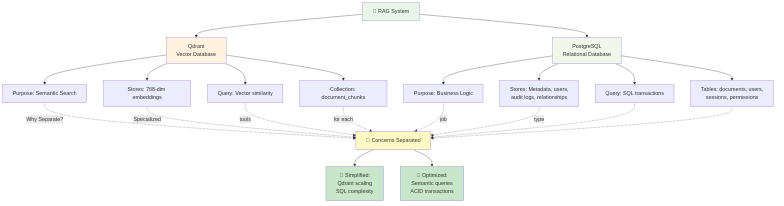
Key Decision: Metadata lives in PostgreSQL, not Qdrant. While Qdrant supports payload storage, separating concerns means:
- Complex business queries stay in relational SQL
- Vector search focuses on semantic similarity
- No duplication of audit/compliance data
**n8n - Workflow Orchestrator**
Purpose: Visual workflows for document ingestion and query pipelines
Why n8n:
- Low-code workflow design (visual debugging)
- Handles async operations (PDF parsing, embedding generation)
- Error handling and retry logic built-in
- Transform/normalize data between services
Core Workflows:
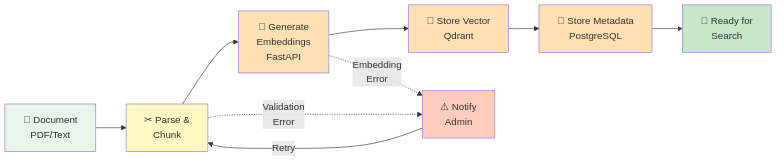
- PDF Upload → Parse → Chunk → Embed → Store
- User Query → Embed → Search → Retrieve → LLM → Answer
- Document Deletion → Cleanup vectors + metadata
- Scheduled re-indexing and health checks
**FastAPI - Python NLP Engine**
Purpose: Embedding generation and reranking
Why FastAPI:
- Python ecosystem for NLP (sentence-transformers, Hugging Face)
- Fast async performance
- OpenAPI documentation auto-generation
- Easy model switching via configuration
Endpoints:
/embed- Generate vector embeddings for text/rerank- Refine search results for relevance/config- Query available models and configuration
**PostgreSQL - Metadata & Business Logic**
Purpose: Relational data, sessions, audit trails
Stores:
- User accounts and permissions (RBAC)
- Document metadata (title, source_url, upload_date, owner)
- Chat sessions and conversation history
- Contexts (knowledge domains like "HR Policies", "Tech Docs")
- Chunk text and references (linked to vector IDs)
Why separate from vector DB: SQL excels at joins, transactions, and complex queries. Compliance audits need relational integrity.
**NestJS Backend - Secure API Layer**
Purpose: Business logic, authentication, document management
Built on the RAD-System framework (read more), this service provides:
- JWT-based authentication with refresh tokens
- Role-based access control (User, Admin, SuperUser)
- RESTful API for all CRUD operations
- Integration with n8n workflows
- Swagger documentation at
/api-docs/v1
Framework Benefits:
- Generic base services (DRY principle)
- Built-in soft-delete and audit columns
- Database-agnostic SQL helpers (PostgreSQL, MySQL, SQLite)
- Security-first interceptors and guards
**Angular Frontend - Modern Chat Interface**
Purpose: User-facing chat UI and admin features
- Standalone components (no NgModules)
- Material Design 3 (mat-components)
- Transloco for i18n (multi-language support)
- Real-time chat with streaming responses
- Admin dashboard for document/context management
- Role-based UI rendering
**Redis - Caching Layer**
Purpose: Performance optimization
- Session storage (JWT validation caching)
- Frequently accessed configuration
- Rate limiting for API endpoints
Document Flow: From Upload to Searchable Knowledge
Here's how a PDF becomes queryable knowledge:
[User Uploads PDF]
       ↓
[Backend: Store file, create metadata record]
       ↓
[Trigger n8n workflow]
       ↓
[n8n: Fetch PDF from storage]
       ↓
[n8n: Extract text (Unstructured.io / PyPDF)]
       ↓
[n8n: Split into chunks (500-1000 tokens)]
       ↓
[n8n: Call FastAPI /embed for each chunk]
       ↓
[FastAPI: Generate vector embeddings]
       ↓
[n8n: Store vectors in Qdrant with document_id reference]
       ↓
[n8n: Store chunk text in PostgreSQL with vector_id]
       ↓
[n8n: Update document status to "indexed"]
       ↓
[User notified: Document ready for queries]
Key details:
- Chunks overlap by 100 tokens (context continuity)
- Each chunk carries metadata:
{document_id, page_number, context_key} - Transaction safety: rollback on failure (no partial indexes)
Query Flow: From Question to Cited Answer
When a user asks a question:
[User: "What is the vacation policy?"]
       ↓
[Frontend: Send to NestJS /chat/query]
       ↓
[NestJS: Validate user permissions + context access]
       ↓
[NestJS: Trigger n8n RAG workflow]
       ↓
[n8n: Call FastAPI /embed with question]
       ↓
[FastAPI: Convert question to vector]
       ↓
[n8n: Search Qdrant (top_k=5, filtered by context)]
       ↓
[Qdrant: Return 5 most similar chunk IDs + similarity scores]
       ↓
[n8n: Fetch chunk text from PostgreSQL]
       ↓
[n8n: Optional reranking via FastAPI]
       ↓
[n8n: Build LLM prompt with retrieved context]
       ↓
[n8n: Route to configured LLM (Gemini/OpenAI/Ollama)]
       ↓
[LLM: Generate answer with citations [REF-1], [REF-2]]
       ↓
[n8n: Map citations to source documents]
       ↓
[NestJS: Save chat message to history]
       ↓
[Frontend: Display answer with clickable source links]
Performance Optimizations:
- Embedding generation: ~50ms (local) to 200ms (API)
- Vector search: <100ms for 100K documents
- Reranking (optional): Trades speed for precision
- Response streaming: User sees partial answers incrementally

What's Next: Deep-Dive Article Series
This overview scratches the surface. In upcoming articles, we'll explore each component in depth:
- n8n Orchestration: Visual Workflows for AI Pipelines - Deep dive into the ingest/query workflows, error handling, and async patterns
- Qdrant & Vector Embeddings Explained - How semantic search works, choosing embedding models, and tuning relevance
- FastAPI NLP Engine: Embeddings & Reranking - Building the Python service, model selection, and performance optimization
- Secure NestJS Backend with RAD-System Framework - Authentication, RBAC, generic services, and API design
- Angular RAG Chat Interface - Building the frontend, streaming responses, and admin features
- LLM Provider Switching: Freedom of Choice - Configuration strategies, prompt engineering, and cost optimization
- Deployment & DevOps: Docker, Monitoring, and Scaling - Production readiness, observability, and infrastructure
Interested in the project? The RAG System is a commercial product — source code is not published. On GitHub I share the technology overview and documented examples for those who want to understand the architecture before getting in touch.
---
Conclusion
Building a RAG system isn't just about connecting an LLM to a vector database—it's about architectural decisions that respect privacy, enable flexibility, and scale with organizational needs. By designing for agnosticism (cloud vs on-premise), modularity (microservices), and developer experience (visual workflows, auto-generated APIs), the system adapts to diverse requirements without sacrificing security or performance.
The journey from concept to production taught me that no single component matters in isolation—it's the thoughtful integration, the respect for data sovereignty, and the understanding that enterprises need options, not prescriptions, that makes a RAG system truly enterprise-ready.
Stay tuned for the deep-dives. I'm just getting started.
---
Built with: NestJS, Angular, FastAPI, Qdrant, PostgreSQL, n8n, Docker. Powered by the RAD-System framework.