



The Art of Simple Service Orchestration
Why Visual Workflows Beat Custom Code (And When to Extend Them)
When people hear "n8n," they think "workflow automation platform with 1000 pre-built connectors." That's the marketing angle. But in enterprise RAG systems, n8n's real superpower is something simpler and more valuable: orchestrating your custom services into reliable, debuggable workflows.
This is the story of why I chose n8n, how I pragmatically extended it when necessary, and why orchestration matters more than integration nodes.
Beyond Pre-Built Integrations
The n8n ecosystem includes hundreds of pre-built nodes for Slack, Salesforce, Stripe, Google Sheets, and countless other services. Useful—but not why we're here.
For a RAG system, the workflow requirements are specific:
- Parse documents from multiple formats (PDF, DOCX, markdown)
- Split content into semantic chunks
- Generate vector embeddings
- Store vectors and metadata separately
- Route queries to appropriate LLM providers
- Map citations back to original sources
- Handle errors gracefully without losing data
You could build this with:
Option A: Hand-rolled Python/JavaScript scripts
- Pros: Full control, no external dependencies
- Cons: Brittle, debugging is nightmare, no visibility into failures
Option B: Apache Airflow / Prefect
- Pros: Enterprise-grade orchestration
- Cons: Operational burden, infrastructure overhead, DAG in code, DevOps skills required
Option C: Kafka-based event streaming
- Pros: Highly scalable, real-time
- Cons: Absurd complexity for RAG workloads, eventual consistency headaches
Option D: n8n
- Pros: Visual workflows, webhook-native, error handling built-in, zero infrastructure
- Cons: Limited to what nodes support (but that's fixable)
I picked Option D with a twist: replace individual nodes with better solutions when necessary.
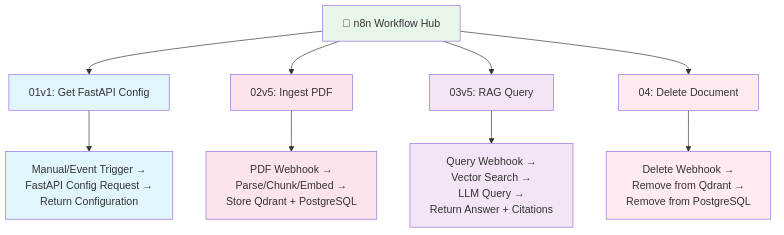
The Pragmatic Philosophy: Orchestrate, Don't Compromise
The key insight: n8n excels at connecting your services, not at being your service.
This means:
- Use n8n to orchestrate the workflow (which service calls which, in what order)
- Build custom services (FastAPI, NestJS, AWS Lambda) for complex business logic
- Let n8n handle error recovery, retries, and data transformation
This is pragmatic engineering: use the best tool for each job, orchestrate with n8n.
Real Case Study: PDF Document Parsing
When I started, PDF parsing was a workflow step through n8n's built-in PDF extraction node. It worked for small documents but fell apart at scale:
- Multi-page documents (200+ pages) caused memory spikes
- Processing time made users wait (5-10 seconds for 50 pages)
- Character encoding issues with bilingual documents
The Problem: n8n nodes run inside n8n's runtime. Memory-intensive operations compete with the orchestration engine itself. Not ideal.
The Solution: Move PDF parsing to FastAPI, triggered by n8n.
We built a dedicated PDF parsing service in FastAPI with:
- PyMuPDF - Fast, lightweight PDF extraction
- pymupdf4llm - Markdown conversion for better AI understanding
- pymupdf-layout - Preserve document structure
Result:
- 400-page document parsed as plain text: <1 second
- Same document with markdown formatting: 3-5 seconds
- Memory remains stable (PDF stays on disk, streaming extraction)
- n8n simply calls this endpoint and continues
The Lesson: Don't be locked into pre-built features. When n8n can't meet your requirements, extend it. Keep orchestration in n8n, push business logic to specialized services.

Workflow Architecture: Conceptual Flows
Rather than explain n8n node details (dive into GitHub repo workflow examples for implementation), here are the conceptual flows that drive your RAG:
Workflow 1: Document Ingestion (02v5 - Ingest PDF Document)
User uploads PDF
    ↓
NestJS backend validates & stores file metadata
    ↓
[n8n Webhook triggered with document ID]
    ↓
n8n: Fetch PDF from storage
    ↓
n8n: Call FastAPI /parse-pdf endpoint (PyMuPDF)
    ↓
n8n: Validate extraction (check token count, etc.)
    ↓
n8n: Call FastAPI /chunk endpoint (semantic splitting)
    ↓
n8n: Call FastAPI /embed endpoint (generate vectors)
    ↓
n8n: Store vectors in Qdrant (with document tracking)
    ↓
n8n: Store chunks & metadata in PostgreSQL (with vector IDs)
    ↓
n8n: Update document status to "indexed" in PostgreSQL
    ↓
n8n: Notify backend of completion (webhook callback)
    ↓
User sees: "Document ready for queries"
Key orchestration logic:
- Validate input before expensive operations
- Atomic operations (all succeed or all rollback)
- Proper error notifications (don't silently fail)
Workflow 2: RAG Query Processing (03v5 - RAG Query Condensed)
User asks: "What is the vacation policy?"
    ↓
Frontend sends question to NestJS /chat/query
    ↓
[n8n Webhook triggered with question + context]
    ↓
n8n: Validate user permissions & context access
    ↓
n8n: Call FastAPI /embed endpoint (convert question to vector)
    ↓
n8n: Search Qdrant (top_k=5, filtered by context_key)
    ↓
n8n: Fetch chunk text from PostgreSQL (by vector IDs)
    ↓
n8n: [Optional] Call FastAPI /rerank endpoint
    ↓
n8n: Build LLM prompt with retrieved context
    ↓
n8n: Route to configured LLM (conditional: Gemini? OpenAI? Ollama?)
    ↓
LLM generates answer with citations [REF-1], [REF-2]
    ↓
n8n: Map citations to source documents
    ↓
n8n: Callback to NestJS with formatted response
    ↓
NestJS saves conversation to chat history
    ↓
User sees: Answer with source links
Key orchestration logic:
- Conditional routing (which LLM to use based on model_id)
- Permission checks before expensive search
- Citation mapping (connecting vector results back to source docs)
Workflow 3: Document Deletion (04 - Delete Document)
Admin clicks "Delete document" in UI
    ↓
NestJS marks document as "deleting"
    ↓
[n8n Webhook triggered]
    ↓
n8n: Delete vectors from Qdrant (by document_id)
    ↓
n8n: Delete chunks from PostgreSQL
    ↓
n8n: Delete metadata from PostgreSQL
    ↓
n8n: Verify deletion (re-query both stores)
    ↓
n8n: Update document status to "deleted"
    ↓
User sees: "Document removed"
Key orchestration logic:
- Across two databases (must succeed in both)
- Verification step (ensure nothing orphaned)
Workflow 4: Configuration & Health (01v1 Workflows)
Brief workflows:
- Get FastAPI Config: Fetch available models, chunk settings, embedding model info
- Get Provider Models: Query configured LLM providers (which are available, API keys valid?)
These keep the system's configuration in sync and enable dynamic model switching.
Orchestration Patterns That Matter
Beyond individual workflows, here are structural patterns n8n handles elegantly:
Error Recovery Without Brittleness
If FastAPI /embed fails → Auto-retry (exponential backoff)
If Qdrant connection times out → Queue and retry later
If LLM API rate-limited → Back off gracefully
→ User-friendly notifications (don't hide failures)
Data Transformation Between Services
Each service speaks its own language (Qdrant vectors, PostgreSQL rows, FastAPI JSON). n8n handles the translation:
PostgreSQL chunk row
  ↓ (n8n transforms)
  ↓
FastAPI input format
  ↓ (n8n transforms)
  ↓
Qdrant vector format
Conditional Routing
If document size > 50MB → Queue for batch processing
If question contains "urgent" keyword → Use faster (less accurate) model
If user is premium tier → Increase top_k for more thorough search
Asynchronous Completion Handling
Documents don't parse instantly. n8n chains callbacks:
n8n triggers FastAPI /parse-pdf
  → Returns immediately (async)
  → User gets "indexing..." status
  → When done, n8n calls NestJS webhook
  → Frontend updates: "ready for queries"
Security: Brief But Practical
In production, a few security patterns matter:
No Execution Logs in Production
n8n tracks execution history. Don't. Logs contain sensitive data:
- Document content
- User queries
- API keys (if accidentally exposed)
Solution: Set n8n retention policy to 1 day or delete daily via cleanup job.
Credentials Never Stored in n8n
Instead of storing LLM API keys in n8n's credential store, pass them in workflow payloads:
{
  "document_id": "abc-123",
  "chunk_data": "...",
  "llm_api_key": "sk-...",  ← Sent per-request
  "context_key": "policy_docs"
}
Backend (NestJS) retrieves the key from secure storage and passes it to n8n. n8n never persists it.
Webhook Validation
Every n8n webhook should verify the caller:
NestJS → n8n webhook
n8n checks: Is this request signed? (HMAC validation)
n8n checks: Does X-API-Token match expected value?
If no → reject
Prevents accidental or malicious webhook triggers.
Idempotency Keys
Prevent duplicate document ingestion if a webhook fires twice:
{
  "document_id": "abc-123",
  "idempotency_key": "ingest-20250218-001",
  "...": "..."
}
PostgreSQL checks: if this key exists, skip. Otherwise, create new ingestion record.
When to Extend n8n (And How)
You'll hit n8n's limits. That's expected. Here's the pattern:
Recognize the limit:
- n8n's PDF node can't handle your document size
- Pre-built integration doesn't exist
- You need custom business logic
Build a service:
- FastAPI endpoint for that specific task
- Document it clearly
- Return standard JSON response
Call from n8n:
- Add HTTP request node in n8n workflow
- Point to your service
- Map response back into workflow
Example: Adding document layout detection
Before: "Extract PDF text" (basic, loses formatting)
↓
After:
  n8n calls FastAPI /extract-pdf-with-layout
  → FastAPI uses PyMuPDF to extract text
  → FastAPI uses pymupdf-layout to detect tables, headers, footers
  → FastAPI returns structured JSON
  → n8n stores enriched chunks in PostgreSQL
You've extended n8n without modifying n8n. Clean.
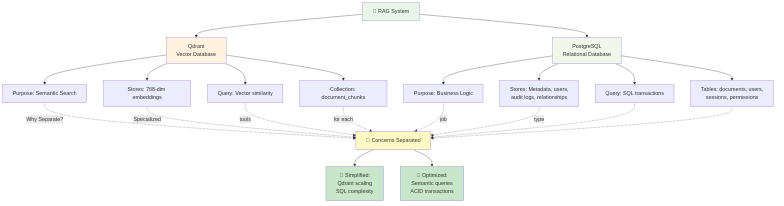
Why Not [Steroid Alternative]?
We tried n8n. It works. Integration with custom services is seamless. Debugging visual workflows is infinitely better than untangling Python callbacks or Airflow DAG configuration.
Could we use Airflow? Sure—but operational burden (Kubernetes, metrics, monitoring) isn't worth it for a focused RAG use case.
Could we hand-roll orchestration in Python? Technically, yes—but rebuilding error recovery, retry logic, and webhooks is reinventing wheels.
Orchestration > Nodes
The real takeaway: n8n isn't valuable because of pre-built nodes. It's valuable because it provides:
- Visual debugging (see exactly where data transforms fail)
- Webhook-native design (perfect for backend-triggered workflows)
- Error recovery primitives (retry, catch, alternative paths)
- Zero infrastructure burden (runs in Docker, stateless)
Pair that with pragmatic engineering (swap out nodes for better services) and you get a RAG orchestration layer that's:
- Maintainable (visual, debuggable)
- Extensible (call any service via HTTP)
- Reliable (built-in error handling)
- Fast (specialized services, not generalist platform)
Conclusion: Pragmatism Over Ideology
The strongest architecture isn't the most elegant—it's the most pragmatic. n8n handles orchestration beautifully. When it falls short (PDF parsing for 400 pages), build something better. Keep orchestration in n8n, push complexity to services that specialize.
This is how enterprise RAG systems are built: smart combinations of focused tools, orchestrated cleanly.
---
Dive Deeper: The GitHub repository contains n8n workflow examples you can import and explore. Some steps include commented guidelines rather than production code — the RAG System is a commercial product with protected intellectual property, so the source is not published. The structure and comments give you everything you need to understand the approach and build your own implementation.
---
GitHub:
- RAD System (open-source): https://github.com/msbragi/rad-system
- RAG System (technology overview & examples — source not published): https://github.com/msbragi/RAG-System-Dist
---
Built with: n8n (orchestration), FastAPI (specialized services), PyMuPDF (PDF parsing), Qdrant (vectors), PostgreSQL (metadata), NestJS (business logic).