



Why Semantic Search Beats Keyword Matching
Search is broken. Try searching your company's documentation with keywords: "vacation days" returns results about medical days off, retirement plans, and travel policies—everything except the actual vacation policy. You're drowning in noise.
This is the limitation of keyword-based search. It looks for exact matches, not meaning. Enter semantic search: understanding what text means, not just what words it contains. And the technology behind semantic search? Vector embeddings.
This article explores what embeddings are, why Qdrant became my vector database of choice, and most importantly: the architectural decisions that make RAG systems resilient and exchangeable.
From Keywords to Semantics: Why It Matters
Imagine your RAG system has indexed 10,000 internal documents about HR policies. A user asks: "How many days off do I get?"
Keyword search approach:
SEARCH documents WHERE content CONTAINS "days" AND "off"
→ Results: vacation days, sick days, maternity leave, time-off request forms...
→ User: "That's not what I asked!"
Semantic search approach:
1. Convert question to a semantic representation
2. Find documents with similar semantic meaning
3. Return: "Vacation Policy" (exact match in meaning)
4. User: "Perfect!"
The difference? Understanding. Semantic search knows that "how many days off" semantically matches "vacation entitlement" even if the exact words differ.
What Are Embeddings? (The Developer's Version)
Skip the neural networks textbook. Here's what you need to know:
Embedding = Text Converted to Numbers
Input: "What is the vacation policy?"
↓
[ML Model processes text]
↓
Output: [-0.042, 0.156, -0.089, 0.203, ..., 0.651]
        (768 numbers representing meaning)
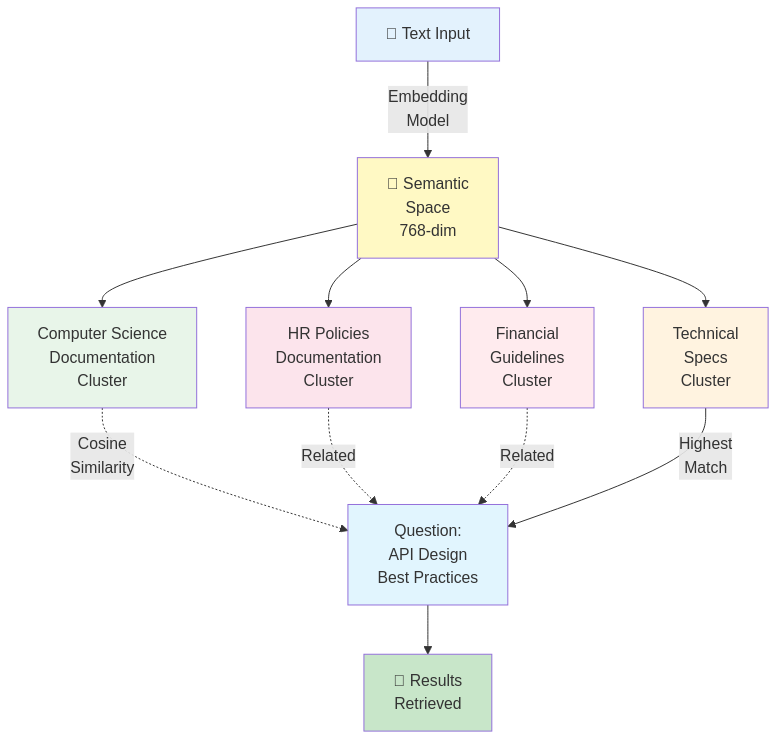
Key insight: Similar meanings cluster together in space.
Semantic Space (visualization):
    "vacation days"  ←→ "time off"  ←→ "days allowed"
            ↓                ↓              ↓
         (similar vectors in space)

    "parking policy"  ←→ "office rules"  ←→ "dress code"
            ↓                ↓              ↓
         (different cluster, far away)
Why it works:
- The ML model learned patterns from billions of texts
- It understands that "vacation days" and "time off" mean similar things
- When you search, it finds the closest semantic neighbors
Math-free explanation: If keywords are GPS coordinates, embeddings are a GPS system that understands context. Same destination, but it knows which roads make sense.
Why Qdrant?
When choosing a vector database, you have options:
| Database | Pros | Cons |
|---|---|---|
| Qdrant | Fast, operator-friendly, clean REST API, horizontal scaling, no schema overhead | Requires separate metadata store (actually a feature, see below) |
| ChromaDB | Simple embedding inference built-in | Limited scale, slower similarity search |
| Weaviate | Rich query language, built-in metadata models | Operational complexity, steeper learning curve |
| Pinecone | Managed (no infrastructure), fully serverless | Vendor lock-in, pricing per vector |
| pgvector (PostgreSQL) | No new tools, all in Postgres | Slower for large-scale similarity search, not optimized for vectors |
My choice: Qdrant
Why?
- Speed: HNSW algorithm (super-fast nearest neighbor search, even with millions of vectors)
- Simplicity: Clean REST API, straightforward collection management
- Scaling: Can run single-node or clustered
- Flexibility: Can replace components without big risk (see "n8n abstraction" below)
- No vendor lock-in: Open-source, self-hosted option
Architectural Decision: Separating Concerns
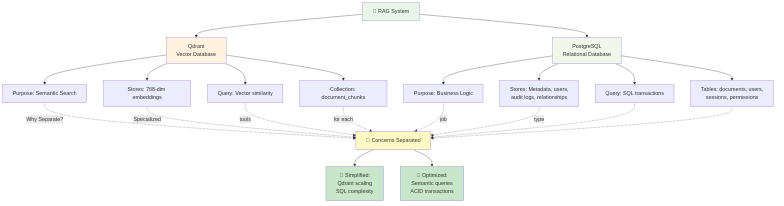
Here's where most people get confused. Qdrant can store metadata alongside vectors (using payloads). "Why don't you just store everything in Qdrant?"
Because separation of concerns beats convenience.
The Case for Separation
Qdrant stores: Vectors + Lightweight References
{
  "id": "chunk_12345",
  "vector": [-0.042, 0.156, -0.089, ...],  // 768 dimensions
  "payload": {
    "document_id": 789,
    "chunk_index": 2,
    "context_key": "policy_docs"
  }
}
PostgreSQL stores: Everything Else
documents table:
  id, title, source_url, uploaded_by, created_at, updated_at, deleted_at

chunks table:
  id, document_id, vector_id, text, page_number, token_count, context_key

contexts table:
  id, context_key, name, owner_id, created_at

users table:
  id, name, email, role, permissions
Why This Split?
1. Performance
- Vector search is optimized for similarity (HNSW). Fast.
- Relational queries (JOINs, transactions) are optimized in SQL. Fast.
- Mixing both in one system? Neither is optimal.
Qdrant: "Find 5 most similar vectors to this query"
  → <100ms for 1M vectors

PostgreSQL: "Which documents does this user own?"
  → Instant JOIN on user_id

Qdrant (if metadata heavy): "Find similar vectors AND filter by user AND JOIN with permissions"
  → Slow. Not its strength.
2. Compliance & Audit
- Regulatory requirements often demand relational integrity
- Soft-deletes, audit trails, RBAC—these live in SQL
- Qdrant payloads aren't transactional
3. Replaceability
- If you swap Qdrant for Weaviate tomorrow, PostgreSQL doesn't change
- If you add a second vector DB for A/B testing, same metadata store serves both
- This is agnostic architecture in action
4. Data Consistency
- Atomic transactions in PostgreSQL guarantee consistency
- Document deletion: update metadata in Postgres, webhook triggers n8n to delete vectors
- No orphaned vectors, no orphaned metadata
Qdrant Concepts: What You Need to Know
Collection = Namespace for vectors
Collection: "policy_documents"
  ├─ Vectors for HR policies
  ├─ All 768-dimensional
  └─ Grouped for easier management

Collection: "tech_docs"
  ├─ Vectors for technical documentation
  └─ Can search independently
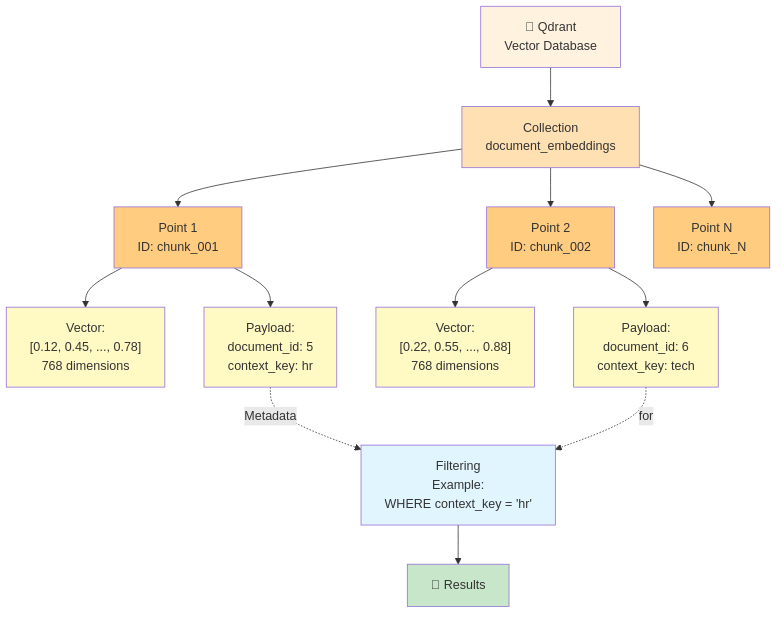
Points = Individual vectors with IDs
Point ID: chunk_12345
Vector: [-0.042, 0.156, ..., 0.651]  (768 dimensions)
Payload: {document_id: 789, chunk_index: 2, context_key: "policy_docs"}
Payload = Lightweight metadata attached to points
Payload (keep minimal):
{
  "document_id": 789,
  "chunk_index": 2,
  "context_key": "policy_docs"
}

For anything complex (user permissions, document titles, audit trails):
→ Reference in payload, fetch from PostgreSQL
Filtering = Restrict search results by payload
Search query:
- Find similar vectors to: [embedding of "vacation"]
- Limit to: context_key == "policy_docs"
- Return: top 5 results

Without filtering (slow if 10M vectors):
→ Search all vectors, rank by similarity, filter after

With filtering (much faster):
→ Filter to context_key first, THEN search
Search in Practice: The Flow
User asks: "What vacation benefits do I get?"
1. Convert question to embedding
   "What vacation benefits do I get?"
   → [-0.015, 0.142, 0.089, ..., 0.523]  (768 dimensions)

2. Query Qdrant (with filtering)
   POST /collections/policy_documents/points/search
   {
     "vector": the_question_embedding,
     "filter": {
       "must": [
         {"key": "context_key", "match": {"value": "policy_docs"}}
       ]
     },
     "limit": 5,
     "score_threshold": 0.7
   }

3. Qdrant returns (by similarity)
   [
     {id: chunk_12345, score: 0.94, payload: {...}},
     {id: chunk_12346, score: 0.91, payload: {...}},
     {id: chunk_12347, score: 0.87, payload: {...}},
     ...
   ]

4. n8n fetches chunk text from PostgreSQL
   SELECT text FROM chunks WHERE id IN (12345, 12346, 12347)

5. Build LLM prompt with context
   "Based on this information: [chunk text], answer: [question]"

6. LLM generates answer with citations
   "You get 20 days of vacation per year [chunk_12345]"
Key metrics:
- Similarity score: 0–1 (1 = perfect match, higher is better)
- Threshold: 0.7 means "only return results that are at least 70% similar"
- Top_k: 5 means "return the 5 closest matches" (tunable trade-off: more = more context but slower)

The n8n Abstraction Power: The Real Insight
Here's the critical architectural pattern that makes your RAG system resilient and flexible:
n8n doesn't care which vector database you use.
n8n workflow (currently calls Qdrant):
  ↓
  Call HTTP endpoint: POST /vector/search
  {query_embedding, context_filter}
  ↓
  Receives: [similar_vectors]
  ↓
  Continues workflow
Could you swap implementations?
Today:   POST http://qdrant:6333/collections/policy/points/search
Tomorrow: POST http://weaviate:8080/v1/objects/search

n8n workflow: unchanged
NestJS backend: unchanged
FastAPI: unchanged

Same orchestration, different backend.
Why does this matter?
- Vendor independence: Not locked into Qdrant forever
- A/B testing: Run Qdrant and Weaviate in parallel to compare
- Scaling: Swap a single-node Qdrant for a clustered Qdrant seamlessly
- Risk mitigation: If Qdrant has issues, you have an escape hatch
The principle: Database abstraction at the orchestration layer (n8n) means business logic (NestJS) and specialized services (FastAPI) remain untouched.
This is pragmatic resilience.
Performance Considerations (Conceptual)
HNSW Algorithm (mentioned for context, not explained):
- Hierarchical Navigable Small World
- Fancy way of saying: "Super-fast nearest neighbor search"
- Builds an index structure so searching 1M vectors takes ~50ms
Top_k tuning:
top_k = 3 (fast, minimal context)
  → Quick response, might miss relevant documents

top_k = 10 (balanced)
  → Good context, still fast (<100ms search)
  → Usually optimal for RAG

top_k = 50 (thorough, slower)
  → Maximum context, might include noise
  → Search time increases
Similarity threshold:
threshold = 0.5 (permissive, more results)
  → Returns loosely related documents
  → Better for brainstorming queries

threshold = 0.8 (strict, fewer results)
  → Only highly relevant documents
  → Risk of missing related information
Scaling insight: Qdrant's performance stays <100ms even with 10M vectors if indexed efficiently. This is why HNSW matters.
Conclusion: The Vector Renaissance
Vector databases represent a paradigm shift in search and retrieval. Instead of asking "what exact words appear?", RAG systems ask "what similar meanings exist?" This is fundamentally more useful for knowledge work.
Qdrant became my choice because of pragmatism: fast, simple, and most importantly, architecturally replaceable. By separating vectors (Qdrant) from metadata (PostgreSQL) and orchestrating them via n8n's HTTP layer, I built a RAG system that adapts without breaking.
The real power isn't Qdrant itself. It's a system design philosophy: use the best tool for each job, compose them loosely, and make substitutions painless.
---
Built with: Qdrant (vector search), PostgreSQL (metadata), n8n (abstraction layer), FastAPI (embeddings), NestJS (business logic).